
2 more Wazuh detections: an LSASS dump Windows blocked, and a Run key rule that took 3 tries
Sprint-30, detections 2 and 4: when hardening beats the attack, and when built-in rules and doubled backslashes hide your events

Last week I published 3 Wazuh detections from my home lab. This post adds the two missing ones: an LSASS credential dump and Registry Run key persistence. Same loop as before: trigger the attack with Atomic Red Team → find the raw Sysmon event → write the rule → trigger again → hunt for false positives.
Neither went to plan, and that's what this post is about. Windows blocked the first attack before my rule ever saw it, and the second rule took three tries to fire.
Detection 2: LSASS dump via comsvcs.dll (T1003.001)
What it catches. lsass.exe holds the credentials of logged-in users in memory. A classic living off the land way to steal them is the built-in comsvcs.dll, whose MiniDump export writes LSASS memory to a file. The attacker then reads the hashes out of it offline.
The test. Atomic Red Team, Dump LSASS.exe Memory using comsvcs.dll. With Defender on, it was blocked at once (Windows Security pop-up), so I switched real-time protection off for the test. Sysmon Event 1 on WIN11:
Image:       C:\Windows\System32\rundll32.exe
CommandLine: "C:\Windows\System32\rundll32.exe" C:\windows\System32\comsvcs.dll MiniDump 872 C:\Users\labadmin\AppData\Local\Temp\lsass-comsvcs.dmp full
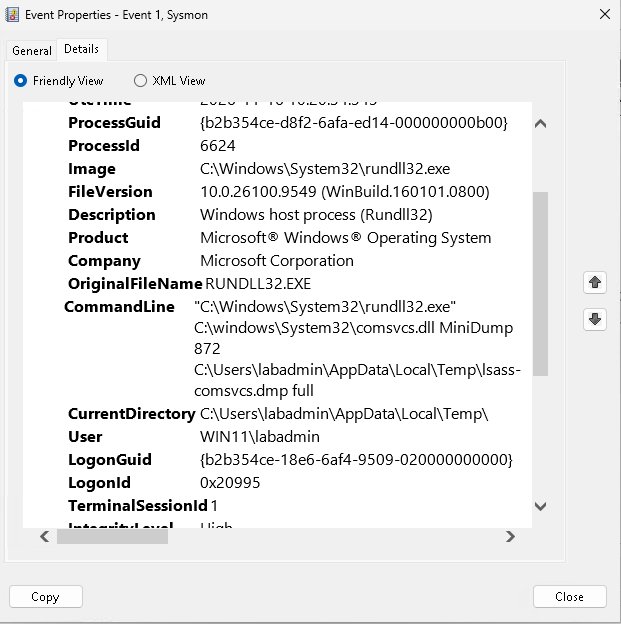
The surprise: no dump. The test finished, but the dump file didn't exist, and Sysmon logged no Event 10 (process accessed lsass). Defender was off, so it wasn't Defender. It was LSA protection:
Get-ItemProperty "HKLM:\SYSTEM\CurrentControlSet\Control\Lsa" | Select-Object RunAsPPL, RunAsPPLBoot
# RunAsPPL 2, RunAsPPLBoot 2
With LSA protection on, lsass.exe is a protected process: even an admin process can't read its memory. Recent Windows 11 installs turn it on by default. The attacker's tool started, but got nothing. I left it on, because that's the realistic setup.
The rule. Watch the attempt, not the access: rundll32.exe with comsvcs and minidump in its command line.
<rule id="100102" level="14">
  <if_sid>61603</if_sid>
  <field name="win.eventdata.image" type="pcre2">(?i)\\rundll32\.exe$</field>
  <field name="win.eventdata.commandLine" type="pcre2">(?i)comsvcs.*minidump</field>
  <description>Sprint30 D2: LSASS dump via comsvcs MiniDump</description>
  <mitre><id>T1003.001</id></mitre>
</rule>
Re-triggered: 100102 fired at level 14. Wazuh's built-in LSASS rule 92900 stayed silent, because it watches Event 10, and the access never happened.
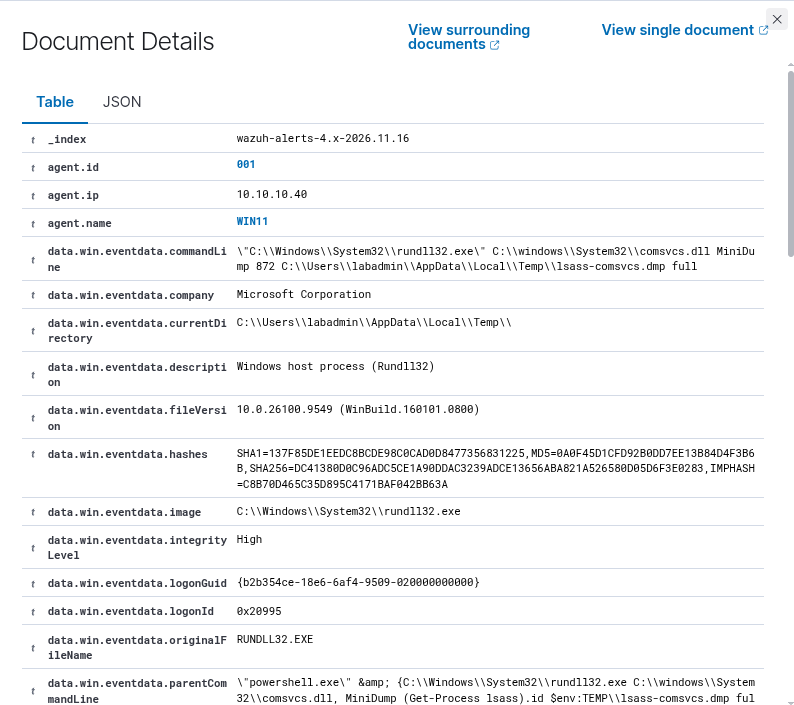
What it misses. MiniDump called by its ordinal (comsvcs.dll, #24), and every tool that doesn't use comsvcs at all (ProcDump, Mimikatz, Task Manager's Create dump file). For those you need the Event 10 angle, so run both rules side by side. False positives: none, and none expected. Legitimate software doesn't dump LSASS through comsvcs.
Detection 4: Registry Run key (T1547.001)
What it catches. Anything listed under …\CurrentVersion\Run (or RunOnce) starts at every logon. One registry value, and malware survives a reboot. The per-user key doesn't even need admin rights.
The test. Atomic Red Team, Reg Key Run: reg.exe adds a value Atomic Red Team pointing to C:\Path\AtomicRedTeam.exe. Sysmon Event 13:
Image:        C:\WINDOWS\system32\reg.exe
TargetObject: HKU\S-1-5-21-…-1001\Software\Microsoft\Windows\CurrentVersion\Run\Atomic Red Team
It took three tries.
| Try | What I changed | Result |
|---|---|---|
| 1 | Rule under the Sysmon Event 13 base rule 61615 | No alert. Built-in rule 92302 (Run key modified using reg.exe, level 6) claimed the event first, and Wazuh only checks the children of the rule that matched |
| 2 | Added 92302 as a second parent | Still no alert. Wazuh stores the path as CurrentVersion\\Run\\Atomic Red Team, with doubled backslashes. My regex expected one |
| 3 | \\+ (one or more backslashes) between the path parts |
Fires at level 10 |
<rule id="100104" level="10">
  <if_sid>61615, 92302</if_sid>
  <field name="win.eventdata.targetObject" type="pcre2">(?i)\\CurrentVersion\\+Run(Once)?\\+</field>
  <description>Sprint30 D4: Run key value set</description>
  <mitre><id>T1547.001</id></mitre>
</rule>
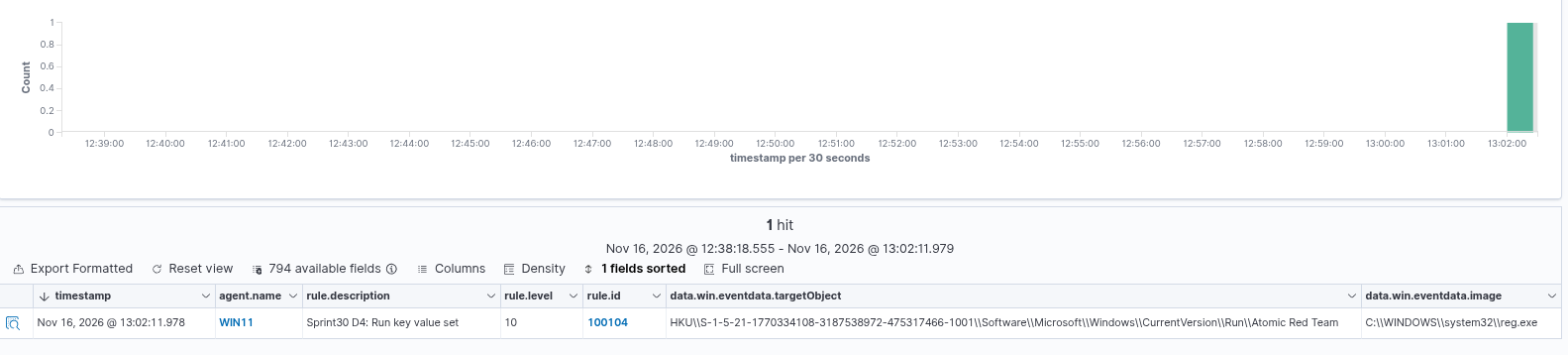
Why not just use 92302? It only fires when the value is written with reg.exe. 100104 fires for any writer: PowerShell's Set-ItemProperty, malware calling the registry API, an installer. That's new coverage, not just a higher level.
False positives. I checked 24 hours of alerts and started Edge and OneDrive, which like to write their own Run entries: only the Atomic test showed up. In a real network, expect installers and updaters (OneDrive, Teams, Edge AutoLaunch). Allow-list them by the writing program, not by value name, because names are easy to fake.
What surprised me
- Hardening beat the attack before detection mattered. LSA protection stopped the dump cold. The detection's job changed from "catch the theft" to "tell me somebody tried", and that attempt is the alert you want.
- Built-in rules can swallow your events. Twice now (encoded PowerShell last week, Run keys this week), a built-in Wazuh rule matched first and my rule never got checked. Fix: list the built-in rule as a second parent.
- Wazuh doubles the backslashes in Windows paths. A regex that matches one backslash between path parts silently never fires.
\\+fixes it.
All 5 detections, as Wazuh rules and as Sigma: detection-lab/wazuh and detection-lab/sigma.
About the author
- 30 years in creative leadership (in the ad industry as a Creative Director) taught me one core skill: dissecting complex systems and finding the flaw before someone else does. My tech roots run back to 8-bit machine code on a C64 (yeah – 80s, baby!) Today, I’m combining that legacy hacker curiosity with modern threat detection and offensive security. BATTLE-TESTED LOGIC: Decades of high-pressure problem solving and systems analysis. HACKER MINDSET: I don't just follow playbooks; I reverse-engineer how the attack path actually works. CONTINOUS SKILL-UP: CompTIA Security+ certified (among other certs), building home labs, and constantly training for L1 ops to future Pentesting.
Comments
Join the discussionNo comments yet. Be the first to comment.
Sprint-30
30 working days of hands-on security: a home SOC lab, detection engineering, pentesting and Active Directory attack + defence. Everything from my own lab.